Steam Controller: The Ars Technica review
Ars Technica ·
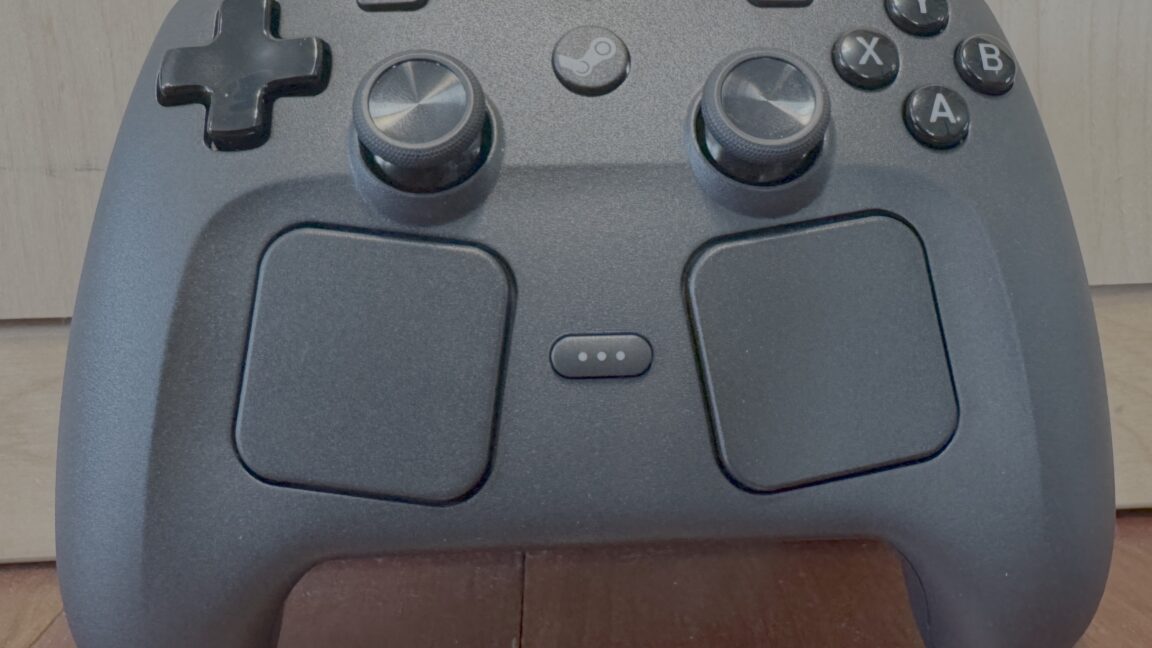
The touchpads can even be set up to control the mouse on the Windows desktop, using one touchpad to move the pointer, the other for a scroll-wheel effect, and the shoulder buttons to click. …
The touchpads can even be set up to control the mouse on the Windows desktop, using one touchpad to move the pointer, the other for a scroll-wheel effect, and the shoulder buttons to click. It’s not the ideal Windows experience, but it can be handy for switching quickly to non-gaming apps without needing to take your hand off the controller. The touchpads seem to take up a lot of space but are easy to ignore if you’re not actively using them. The touchpads seem to take up a lot of space but are easy to ignore if you’re not actively using them. The touchpad on the Steam Controller is a little angled compared to the similar one on the Steam Deck. Kyle Orland The touchpad on the Steam Controller is a little angled compared to the similar one on the Steam Deck. Kyle Orland The touchpads seem to take up a lot of space but are easy to ignore if you’re not actively using them. The touchpad on the Steam Controller is a little angled compared to the similar one on the Steam Deck. Kyle Orland I even found myself playing around with the touchpads in games that had thumbstick controls available. In first-person shooters, for instance, the touchpad can approach (but not quite match) the speed and precision of mouse-based aim, with momentum-based flicks for quick turning and more fine-grained thumb twiddling for small adjustments. While mastering this kind of aim takes some practice, it’s a revelation once you’ve got it down. …
Original source: Ars Technica